Debugger Support
Currently, Boost.Decimal supports pretty printing with LLDB and GDB.
LLDB
To load the pretty printer, add the following line to your .lldbinit:
command script import /path/to/decimal/extra/decimal_printer_lldb.pyGDB
To load the pretty printer, add the following line to your .gdbinit:
source /path/to/decimal/extra/decimal_printer_gdb.pyor you can source it manually in GDB:
(gdb) source /path/to/decimal/extra/decimal_printer_gdb.pyExample
Once you have loaded a pretty printer, you can run the below example to see how different values are represented with the pretty printer. This expected output of the example below was taken from LLDB, but the results should be quite similar when using GDB.
// Copyright 2025 Matt Borland
// Distributed under the Boost Software License, Version 1.0.
// https://www.boost.org/LICENSE_1_0.txt
//
// This example, when run with the pretty printers, shows how various values are represented

#include <boost/decimal/decimal32_t.hpp>        // For type decimal32_t
#include <boost/decimal/decimal64_t.hpp>        // For type decimal64_t
#include <boost/decimal/decimal128_t.hpp>       // For type decimal128_t
#include <boost/decimal/decimal_fast32_t.hpp>   // For type decimal_fast32_t
#include <boost/decimal/cmath.hpp>              // For nan function to write payload to nans
#include <limits>

template <typename T>
void debug_values()
{
    // Displays the maximum and minimum values that the type can hold
    // from numeric_limits
    const T max {std::numeric_limits<T>::max()};
    const T min {std::numeric_limits<T>::min()};

    // A number whose representation will change based on IEEE vs fast type
    // In the IEEE case 3.140e+00 will be displayed as the pretty printer is cohort preserving
    const T short_num {"3.140"};

    // Shows how infinities will be displayed
    const T pos_inf {std::numeric_limits<T>::infinity()};
    const T neg_inf {-std::numeric_limits<T>::infinity()};

    // Shows how the different kinds of NANs will be displayed
    const T qnan {std::numeric_limits<T>::quiet_NaN()};
    const T snan {std::numeric_limits<T>::signaling_NaN()};

    // Shows how a payload added to a QNAN will be displayed
    const T payload_nan {boost::decimal::nan<T>("7")};

    // Break Here:
    static_cast<void>(max);
    static_cast<void>(min);
    static_cast<void>(short_num);
    static_cast<void>(pos_inf);
    static_cast<void>(neg_inf);
    static_cast<void>(qnan);
    static_cast<void>(snan);
    static_cast<void>(payload_nan);
}

int main()
{
    debug_values<boost::decimal::decimal32_t>();
    debug_values<boost::decimal::decimal64_t>();
    debug_values<boost::decimal::decimal128_t>();

    debug_values<boost::decimal::decimal_fast32_t>();
    debug_values<boost::decimal::decimal_fast64_t>();
    debug_values<boost::decimal::decimal_fast128_t>();

    return 0;
}
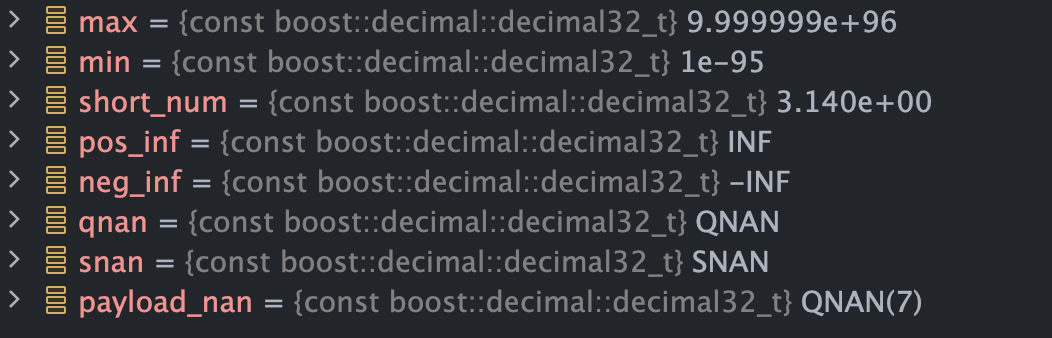
Expected Output for T = decimal32_t:
Expected Output for T = decimal_fast32_t:
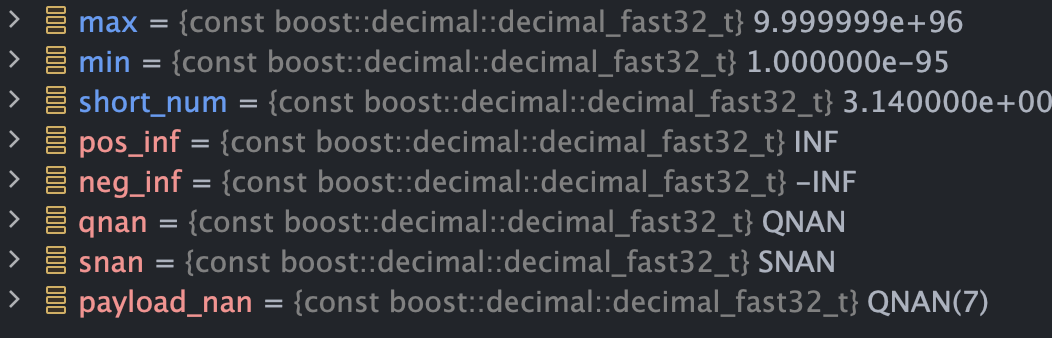
The reason for the difference in how decimal32_t and decimal_fast32_t is displayed is due to Cohorts and Normalization
-
decimal32_t,decimal64_tanddecimal128_tdebuggers are cohort preserving -
decimal_fast32_t,decimal_fast64_tanddecimal_fast128_tdebuggers are always normalized